Configure device policies
Device policies apply to the managed device itself. User settings apply to a signed-in managed user, and managed guest session settings apply only inside that session. Choose the correct policy area before editing.
Before you begin
- Put test devices in a pilot organisational unit.
- Record the current value and the expected result.
- Confirm that your admin role can edit device settings.
Change a device policy
- Open Business+ → Device Settings.
- Select the target Organisational Unit.
- Use Search or Add New Search Filters to find a setting.
- Review whether the setting is Inherited from FydeOS default, inherited from a parent unit, or Locally Applied.
- Change only the required setting.
- Confirm that Updated setting entries shows the expected number of changes.
- Click Save.
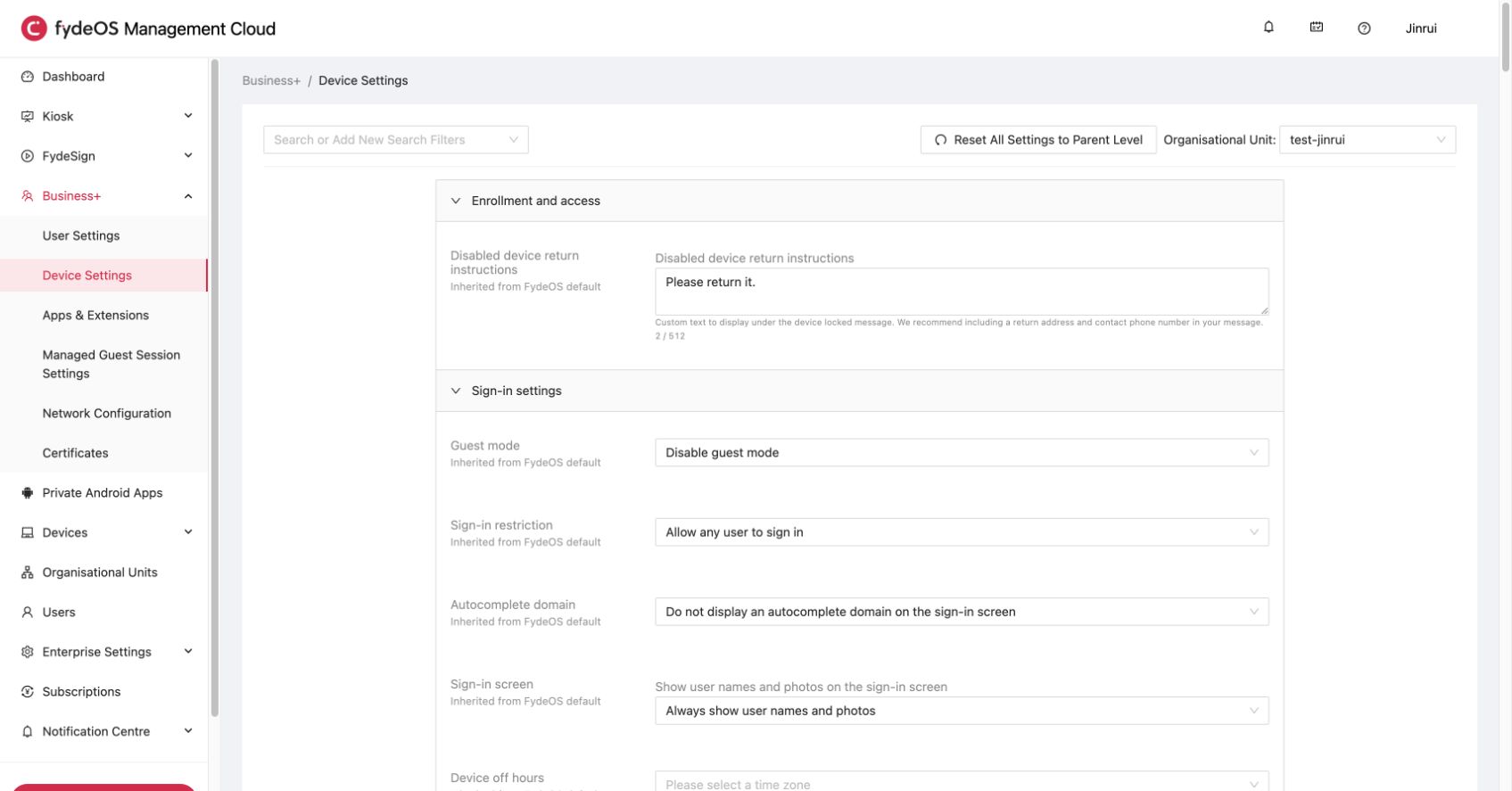
Understand inheritance
- A child organisational unit inherits settings from its parent until you apply a local value.
- A locally applied value overrides the inherited value for that unit and its descendants.
- Reset All Settings to Parent Level removes local overrides from the selected unit. It is a broad action; use it only when that is your intent.
- Revert discards unsaved changes on the current page.
Verify a policy
- Open Devices → Kiosk & Business+ Devices.
- Find a pilot device in the target organisational unit.
- Open the device and check Last Policy Sync.
- Keep the device online and trigger a normal restart only when the policy requires it.
- Confirm the expected behaviour on the device.
If a policy does not apply, see Troubleshooting checklist.
Common policy locations
| Goal | Console path |
|---|---|
| Restrict who can sign in | Business+ → Device Settings → Sign-in settings |
| Control guest mode | Business+ → Device Settings → Sign-in settings |
| Configure updates | Business+ → Device Settings, then search for update |
| Configure user browser behaviour | Business+ → User Settings |
| Configure managed guest sessions | Business+ → Managed Guest Session Settings |
| Deploy apps and extensions | Business+ → Apps & Extensions |
| Configure kiosk power and accessibility | Kiosk → Settings |
Change-management checklist
- Apply one related group of settings at a time.
- Test on at least one representative device.
- Record the organisational unit and previous value.
- Check device behaviour after policy sync.
- Expand to a larger unit only after the pilot succeeds.
What's next
- Device inventory and monitoring, find devices and verify their state.
- Troubleshooting checklist, diagnose common device problems.